Film it. Say it. Done. The flint app is here.
The flint app for capturing building equipment. For iPhone and Android, available today on the App Store and Google Play. Record, talk, done. Even without signal.
Days on end in plant rooms. Typing nameplates into Excel by hand. Or taking photos and typing them up back at the office. Many facility managers know this tedious work all too well.
With flint, your people simply film the building equipment with their phone. We turn it into structured asset data for your CAFM: manufacturer, model, year of manufacture, rated power, location, condition and classification according to eBKP-H, DIN 276 or your catalogue.
Leading FM service providers and in-house teams have already captured more than 200,000 systems this way.
The new flint app makes this even faster and easier, straight from the plant room into the flint platform and your CAFM system. And it's the foundation for guided capture.
§ 01Video vs. Excel
Why video beats Excel and photos
Excel means typing. Photos mean typing later. Video means: film it, done.
| Excel and photos | Video with flint | |
|---|---|---|
| On site | Type up or photograph nameplates | Film and talk, 400–500 systems a day |
| What gets captured | Whatever the person notes, depending on experience | The whole system, systematically: nameplate, condition, location, surroundings |
| Back at the office | Type up, sort, clean up | Just check, flint classifies by your catalogue |
| Later | No evidence, new questions mean another trip | Video as evidence, answers often already in it |
All in all: up to 10× faster, 40–60% cheaper and up to 5× more CAFM-ready data points.
§ 02The app
What the app does
Recording and uploading are now one step.
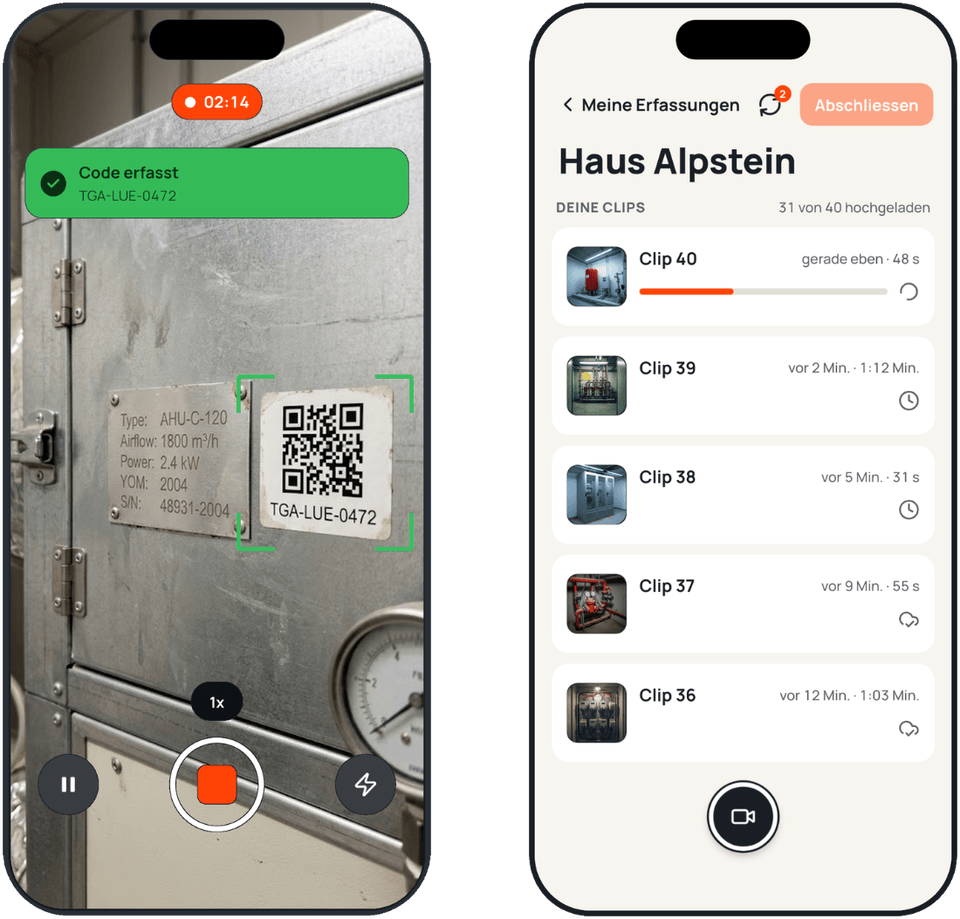
QR codes recognised.
The app reads codes as you film and warns you right away if one can't be read.
Works without signal.
Recording carries on in the basement. Uploads run automatically in the background as soon as there's a connection again, via WiFi or mobile data.
Everything arrives.
Every clip shows its status. You can only complete the capture once everything is up, in full quality.
Kept separate.
Clips stay out of the camera roll and are deleted from the phone once the capture is complete.
§ 03For you
What this means for you
For FM service providers
- No missed systems, no second trip. Your jobs stay plannable.
- New people are ready right away. Download the app, sign in, film. No lengthy training.
- The inventory comes in your client's format. flint translates the data into their data standard and their CAFM format.
For owners and in-house FM
- Your own team films. Your caretaker or in-house technician, no outside capture team needed.
- Check instead of type. What gets said while filming goes straight into the data.
- All your equipment in one place. In the flint platform, with export to your CAFM or as Excel.
§ 04App or browser
App or browser. Your choice.
Not everyone is allowed to install apps on their work phone. Many company phones are managed, and external apps are blocked. For some customers, that's exactly why flint works for them: no app required.
That's why there's also a web upload. If you can use the app, use the app. Everyone else films with the regular phone camera and uploads in the browser. Clips from both paths end up in the same capture.
§ 05Next
What's next
The app is just the start. Your phone becomes the tool for better building operations. Here's what we're working on:
Guided capture. The app tells you what's still missing before you leave the building.
Recapture and updates on site. A pump got replaced? Film it, and the data is updated. Your inventory stays current instead of being captured once and forgotten.
Checklists for condition assessment and quality control. Structured checks on site. The AI suggests, people decide.
Capture is step one. Keeping the data right is the actual job.
§ 06Get started
Get started
Not a flint customer yet?
We'll show you what this looks like for your building. You get access to the app as soon as your project starts.
Already a flint customer?
Get the app and sign in with your flint login. Try it, break it, and tell us what's missing.